Higher-Ed Resource Guide • Updated for 2026
The Complete Guide to Student Information Systems for Higher Education
Everything community colleges, career schools, and small-to-mid-sized institutions need to evaluate, compare, and choose the right SIS.
What’s Inside This Guide:
We’ll walk you through how a student information system can help you improve efficiency, organize student data, and automate tedious tasks — giving you more time to focus on what really matters.
- What is a student information system?
- Key benefits of SIS software
- What makes a higher-ed SIS different?
- SIS features checklist by department
- What to consider when evaluating an SIS
- On-site vs. cloud-based SIS comparison
- Comparing SIS vendors
- Four questions to ask every SIS vendor
- Finding the right SIS partner
- Additional resources
Section 1
What is a student information system?
At its core, a student information system (SIS) is software that schools use to manage all things student data, from the moment a prospective student first inquires to the day they graduate and beyond.
Think of it as a centralized digital hub for your institution. Every prospect and student has their own record inside the system, and every department, from admissions and the registrar’s office to financial aid, billing and alumni relations, works from the same up-to-date data. No more emails flying back and forth between departments. No more spreadsheets that nobody can find.
When implemented well, an SIS acts as the operational backbone of your school. Staff spend less time searching for information and more time serving students. Leadership gets accurate data for decision-making. And students get a smoother, more connected experience at every step.
SIS vs. ERP
You may also hear the term “ERP” (enterprise resource planning) used in higher education. For schools, an ERP typically includes the full suite of back-office functions: student records, finance, HR and more. CoreCampus operates as an integrated SIS/ERP, covering the complete student lifecycle and core administrative functions in one platform.
A Good SIS Follows the Entire Student Lifecycle
Capture leads, track communications, and manage prospects through your CRM before they ever apply.
Collect and process applications, manage documents, and move students through enrollment seamlessly.
Manage course selection, attendance, grades, and degree progress from one central place.
Package and disburse aid, handle tuition billing, and stay on top of compliance reporting.
Stay connected with graduates, track career placements, and manage giving campaigns.
Section 2
Key Benefits of Student
Information System Software
A well-implemented SIS creates a single source of truth for your institution.
When everyone works from the same data, the positive effects ripple across every department.
+75%
of new SIS purchases since 2021
have been cloud-based systems
98%
increase in SIS adoption driven by pandemic-era modernization needs
$100M+
what large universities can spend over five years on an enterprise SIS
Here is how the right SIS creates meaningful impact for your school:
Automate manual processes, reduce redundant data entry and free your staff to focus on higher-value work.
Generate government reports for Title IV, IPEDS, NSLDS, gainful employment, and 1098-T with confidence and accuracy.
Track prospects through your admissions funnel and use data to identify what's working in your recruiting strategy.
Dashboards and reports give leadership real-time visibility into enrollment trends, financials and student outcomes.
Reduce collection delays, automate billing reminders and get a clear picture of accounts receivable at any time.
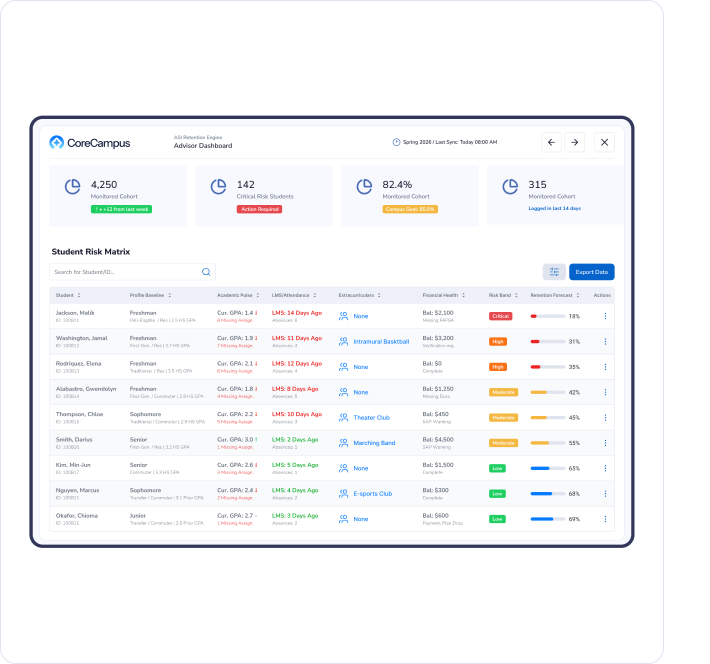
Identify at-risk students early with automated alerts and give advisors the tools to intervene before a student stops out.

What Happens Without a Good SIS?
When student data is fragmented across spreadsheets, email inboxes and disconnected platforms, the consequences are real:
- Disorganization: Departments operating in silos means nobody has the complete picture. Decision-making slows down and costly mistakes happen.
- Inefficiency: Staff burn hours searching for information across multiple systems instead of doing meaningful work.
- Poor User Experience: When systems are clunky or hard to navigate, staff make errors and students fall through the cracks. That has downstream effects on financial aid, attendance and enrollment.
- Compliance Risk: Inaccurate or late reporting can jeopardize accreditation status and federal funding, two things no school can afford to risk.
Section 3
What Makes a Higher-Education SIS Different?
Not all student information systems are built for higher education, and that distinction matters far more than it might seem at first glance.
Some software vendors serve K-12 schools alongside colleges and universities.
The result is often a bloated system full of features you will never use and a notable absence of features you absolutely need, like clock-hour attendance for career and trade programs, integrated financial aid management or degree audit tools.
A purpose-built higher-education SIS is designed to handle the full operational and regulatory complexity of college-level programs.
A Higher-Ed SIS Should Support:
Application management, CRM workflows and inquiry tracking built for the college admissions process.
Self-service portals, health records, housing and academic support tools designed for college-age students.
Course registration, degree audits, plans of study and credit or clock-hour tracking
Packaging, origination, disbursement and federal compliance reporting built into the platform.
Accounts receivable, general ledger, billing and cash management for the back office.
Graduate tracking, gainful employment reporting and fundraising campaign management.
CoreCampus is Built for Higher Education, Not Adapted for It
For career and trade schools, the SIS must also track clock-hour attendance, manage gainful employment data and support compliance with Title IV regulations, none of which are priorities for K-12 systems.
Bring Every Department Together
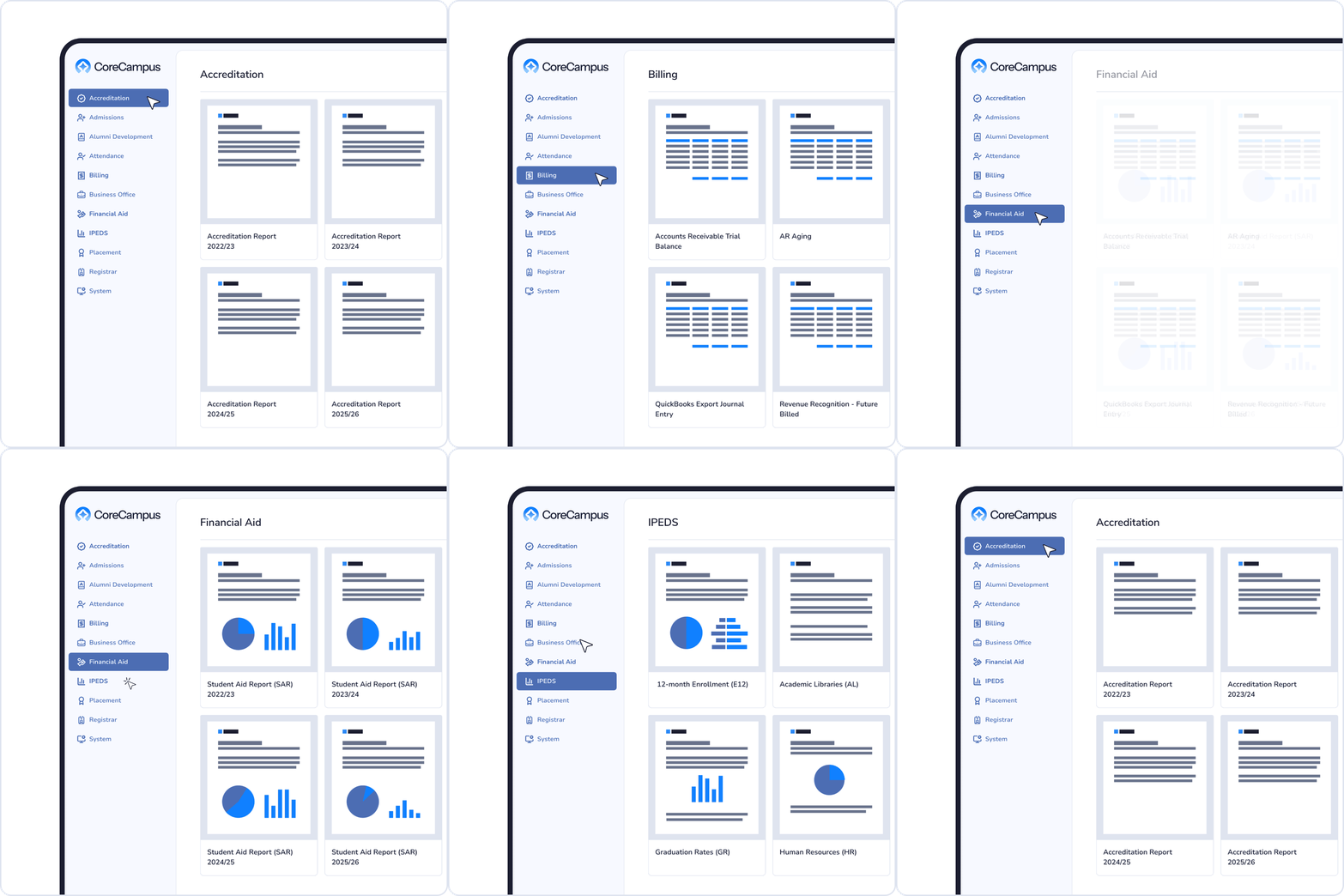
An integrated higher-ed SIS processes student records, including academic progress, course selection, financial aid and demographic data into visual dashboards that every stakeholder can use. Leaders can track KPIs, flag at-risk students, measure the ROI of recruiting campaigns and generate government reports without pulling data from five different places.
Section 4
SIS Features Checklist by Department
Every department at your school will interact with your SIS differently.
Use this checklist to make sure no team gets left behind during your evaluation.
Admissions is the engine of enrollment. Look for tools that help a small team manage leads, follow up fast and move prospects from inquiry to enrolled student.
Integrated CRM
Submit online applications
Embedded Web Forms
Create forms that push inquiry data directly into the CRM so staff can follow up in minutes
Online Application Portal
Prospects can apply and upload documents securely, on their own time
Application Tracking
Monitor application status and coordinate across financial aid, student affairs and other offices
Automated Communications
Trigger personalized emails and texts based on where a prospect is in the admissions funnel
Enrollment Reporting
Track conversion rates and identify bottlenecks in your admissions pipeline
Students expect self-service. The right tools reduce calls to your office and give parents and students direct access to what they need.
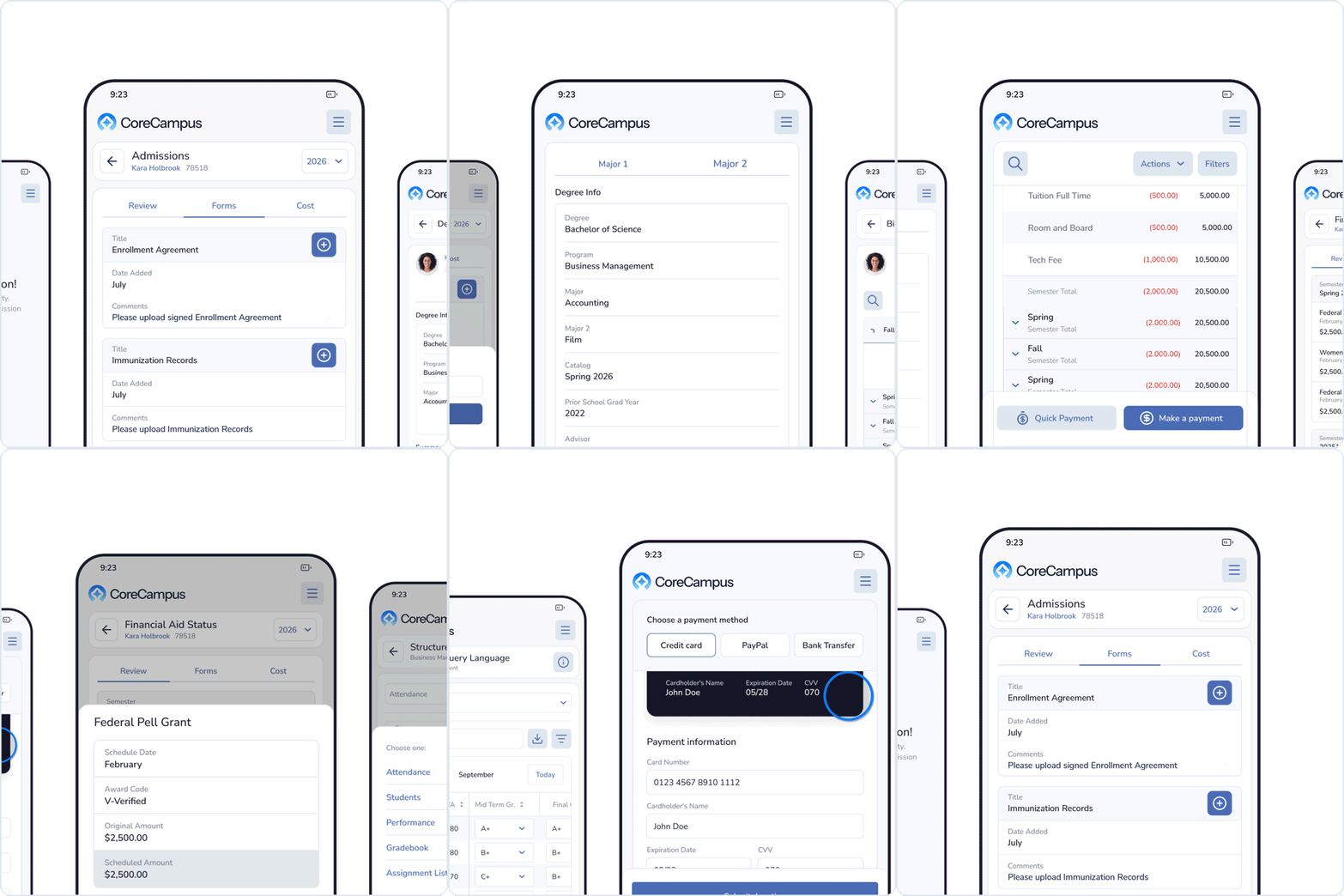
Student/Parent Portal
FERPA-compliant, password-protected access to personal, academic and financial information
Transcripts & Report Cards
Real-time academic progress visible to students, families and administrators
Online Forms & Document Upload
Students submit paperwork digitally; staff can see submission status in real time
Health Records
Track immunizations, allergies and wellness information with automated alerts for missing forms
Housing Management
Manage room assignments, roommate pairings and residence hall capacity
Discipline Tracking
Log and resolve judicial matters; flag students who may need intervention
Registrars need accuracy, speed and tools that eliminate manual data entry. These features make a real difference on a busy registration day.
Course Registration
Students self-register via portal; the system checks prerequisites and flags conflicts automatically
Plan of Study
Maps a student's path from enrollment to graduation, including required courses and electives
Degree Audit Tools
Track program completion and alert advisors and students when requirements are unmet
Digital Attendance
Clock-hour and credit-hour attendance options; students can log via app or faculty can enter online
Class Management
Faculty can view rosters, manage waitlists, and communicate with students inside the platform
Academic Alerts
Automated flags for at-risk students based on grades, attendance, or missing assignments
Financial aid is one of the most compliance-intensive areas of any school.
An integrated module reduces errors and keeps your office on top of federal requirements.
Aid Packaging & Disbursement
Package, originate and disburse Title IV aid directly from the SIS without a third-party provider
Pre-Built Government Reports
ISIR, NSLDS/Clearinghouse, FISAP, IPEDS, 90/10, Gainful Employment, SAP and 1098-T
Real-Time Notifications
Staff and students get alerts when aid is disbursed, verifications are needed or deadlines approach
Student Aid Portal
Students can view cost estimates, accept awards, and track their financial aid status online
Reconciliation Tools
Verify and reconcile funds against disbursement records to stay audit-ready
SAP Tracking
Monitor satisfactory academic progress requirements tied to aid eligibility
The business office needs visibility and control. These features keep cash flow healthy and operations organized.
Accounts Receivable
Process payments from students and vendors; integrate with external bookkeeping tools like QuickBooks
Student Billing
Automated billing statements, online payment options and payment plan management
Financial Dashboards
Reports on unearned revenue, AR aging, AP aging and bank reconciliation in one view
Payment Collection Automation
Trigger reminders and notices via email, text or phone for overdue balances
Stripe Payment Integration
Accept online payments securely with Stripe processing built into the billing workflow
Third-Party Integrations
Connect with accounting, digital signature and notification platforms your team already uses
Alumni relations connect your graduates to your institution’s future. A good SIS keeps their data fresh and their engagement strong.
Alumni CRM
Keep graduate contact information current and track engagement history from student to donor
Career Placement Tracking
Record employer, salary, title, and placement data for gainful employment reporting
Campaign Management
Plan, track and evaluate fundraising campaigns and manage gift-giving and donations
Alumni-Student Connections
Admissions and alumni teams can collaborate to connect prospects with relevant alumni mentors
Faculty need tools that simplify classroom management so they can focus on teaching, not paperwork.
Digital Grade Book
Enter grades directly into the SIS for real-time accuracy; no more end-of-term data dumps
Class Roster Management
View rosters, student photos and profiles; communicate with individual students or entire classes
Attendance Tracking
Credit-hour and clock-hour attendance entry; supports both faculty-entered and student self-service options
LMS Integration
Connect with Moodle, Canvas, Blackboard, Brightspace and other learning management platforms
Student Retention Alerts
Flag students who are struggling academically so faculty and advisors can intervene early
Section 5
What to Consider When Evaluating a Student Information System
Beyond the feature list, there are a few structural questions that can make or break your SIS decision.
Consider these as part of your evaluation.
Reporting Capabilities
Schools live and die by their reporting. From federal financial aid submissions to accreditation audits, inaccurate or late reports can have serious consequences. Look for a system that includes:
- Pre-built templates for Title IV, IPEDS, NSLDS, gainful employment, SAP and 1098-T
- Custom report building so your team can create school-specific reports
- Dashboards that give department heads and executives real-time visibility
- Academic, admissions and attendance reports that update automatically
Integrated vs. Best-of-Breed
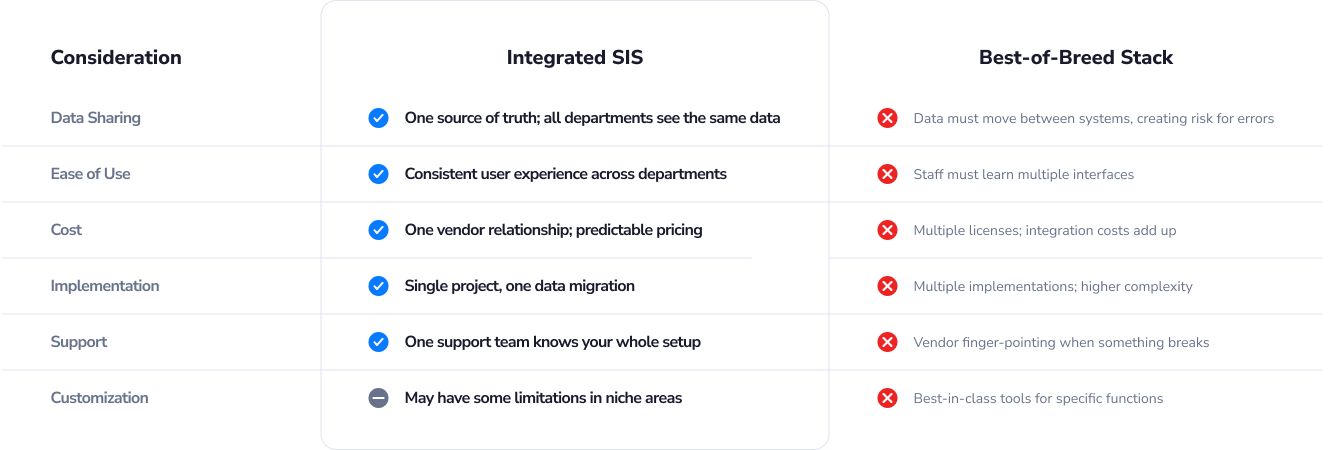
You have two main options: an integrated SIS (one platform that covers everything) or a best-of-breed stack (multiple specialized tools pieced together).
Simple and Powerful
For most community colleges and small- to mid-sized career and trade schools, an integrated SIS is the right choice.
The operational efficiency gains and reduced complexity far outweigh the benefits of assembling a custom stack.
Automation, Alerts
and Workflows
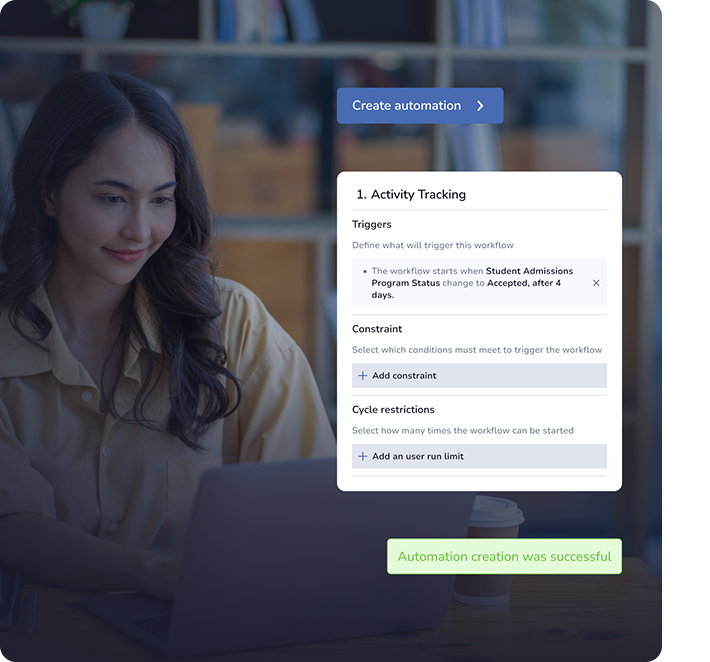
Manual follow-up is a drain on staff time and a root cause of students slipping through the cracks. A modern SIS should include configurable automations, including:
- Attendance alerts when students miss class
- Academic progress alerts for at-risk students
- Billing reminders when payments are due or late
- Audit alerts when degree requirements go unmet
- Custom workflow triggers based on student data changes
Section 6
On-Site vs. Cloud-Based
Student Information Systems
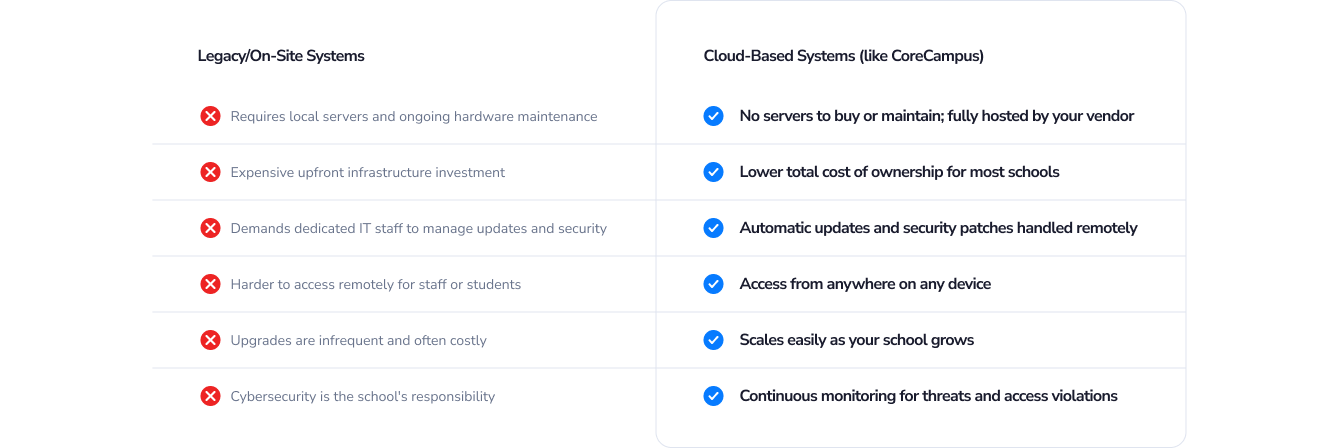
More than 75% of new SIS purchases since 2021 have been cloud-based, and for good reason.
Here is how the two options compare:
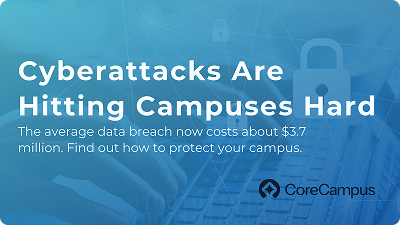
A Note on Cybersecurity
Student data is sensitive. Schools are increasingly targets for cyberattacks, and a cloud-based SIS from a reputable vendor
provides a layer of protection that most small and mid-sized institutions cannot replicate on their own.
When evaluating a vendor, confirm that they follow these standards:
All student data is handled in accordance with federal privacy regulations.
Information is encrypted both in transit and at rest.
User logins require 2FA to prevent unauthorized access.
Credit card transactions meet Payment Card Industry security standards.
Each campus or location gets a separate database to limit breach exposure.
Systems actively scan for suspicious behavior and access violations.

SIS Costs: What to Budget For
Pricing for student information systems varies widely depending on school size, the scope of implementation, customization needs and whether you choose a cloud or on-site model. A few benchmarks to keep in mind:.
- Large research universities can spend more than $100 million over five years on an enterprise SIS
- Smaller institutions with fewer than 2,000 students typically find options in the hundreds of thousands per year or less
- On-site systems carry additional hidden costs: hosting, maintenance, IT support and upgrades
- Cloud-based SaaS models offer more predictable annual pricing
The goal is to find a system that fits your school’s budget today while being able to scale as you grow.
Section 7
Comparing Student Information
System Vendors
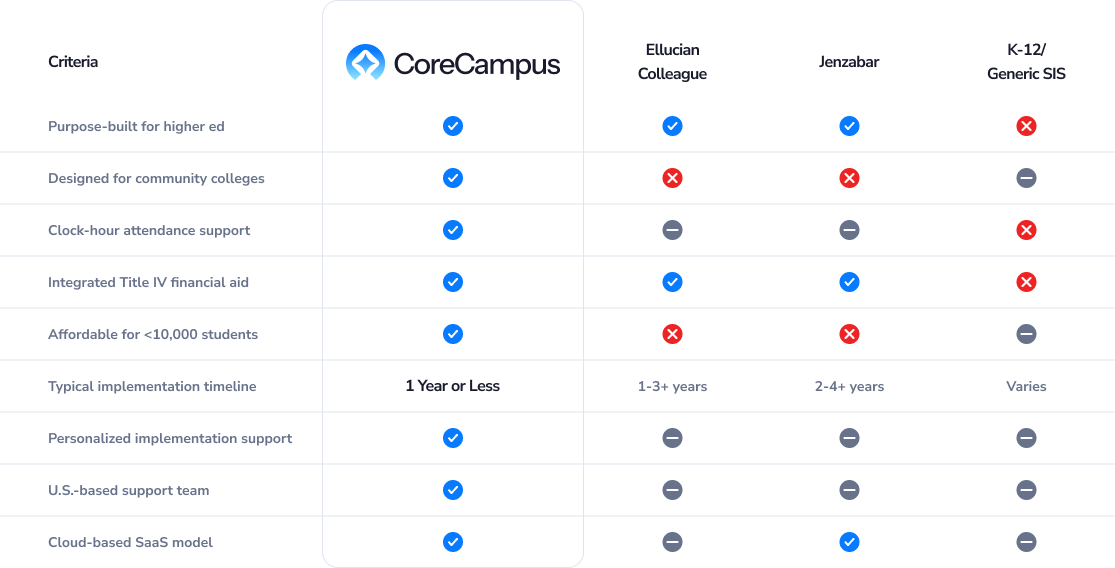
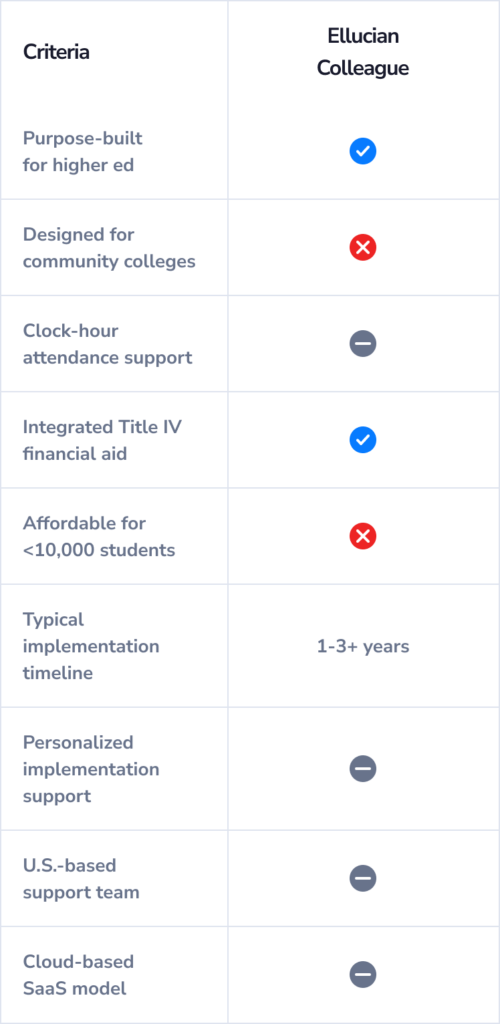
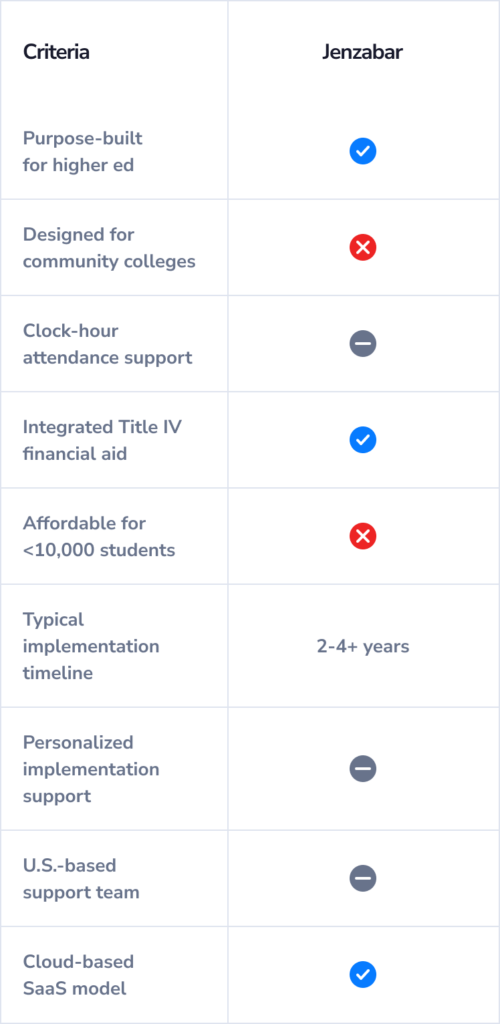
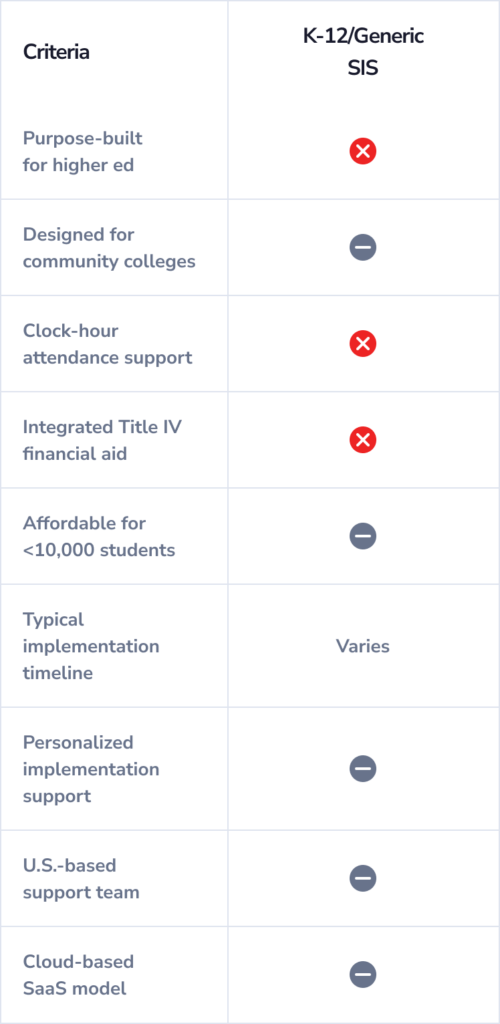
Not every SIS vendor is the right fit for your school. Here is how CoreCampus compares to the enterprise alternatives, particularly for community colleges, career schools and small- to mid-sized institutions.
Here is a side-by-side look:
Enterprise systems like Ellucian Colleague and Jenzabar are built for large research universities with dedicated IT departments, years for implementation and multimillion-dollar budgets. For most smaller institutions, those systems bring more complexity than benefit.
CoreCampus —
Right-Sized Technology,
Real Relationships
When you work with a large enterprise vendor, your school becomes one of thousands of clients. With CoreCampus, you get a technology partner who actually knows your institution, picks up the phone and shows up when something needs attention.
Read the full comparison:
Section 8
Four Questions to Ask Every SIS Vendor
Choosing the right SIS is only half the equation. Before you sign anything, make sure you understand exactly what the implementation, support and partnership experience looks like.
These four questions are non-negotiable.
1. What is your process for data cleansing and migration?
Switching to a new SIS is not plug-and-play. Your existing data lives in legacy systems, spreadsheets and archived emails, and getting it into the new platform cleanly requires a deliberate process. A trustworthy vendor will walk you through:
- Data audit: Identifying what data needs to move, including student records, financial aid files, course information, biographical data and registrar records
- Data organization: Grouping data into logical categories, removing duplicates and correcting errors before migration begins
- Migration method: Manual entry (for very small schools), file upload, or full data conversion for schools with several hundred or more students
Ask specifically whether standard data migration tasks, like moving biographical information, are included in the implementation cost or billed separately. The answer tells you a lot about how a vendor operates.
2. What does the implementation timeline look like?
Implementation timelines can range from a few months to several years depending on the vendor, system complexity, and how prepared your team is. Ohio State University, for example, eventually abandoned a multimillion-dollar Workday Student implementation after years of complications. Smaller schools should not have to take that kind of risk.
Ask vendors to give you a realistic, phased timeline that includes data migration, staff training, testing, and go-live milestones. Ask what happens if timelines slip and how they have handled implementation challenges with schools similar to yours.
CoreCampus has helped hundreds of schools complete implementations efficiently. Learn more about our implementation process.
3. What does ongoing support look like after go-live?
The implementation is just the beginning. Once your system is live, your staff will have questions, and occasionally things will need troubleshooting. Use these questions to vet a vendor’s support model:
- Is your support team U.S.-based?
- What is the average response time for support tickets?
- Can your team access our system remotely to troubleshoot?
- Do you offer on-demand training videos and documentation?
- Is in-person or on-site training included in the implementation cost?
- Do you make site visits after launch to help fine-tune the system?
Not everyone on your staff will be tech-savvy, and that is OK. A good technology partner plans for that reality with role-based training and accessible support resources.
4. What third-party integrations does your system support?
Even the best SIS will need to work alongside other tools your school depends on. Ask about the system’s API capabilities and which integrations are pre-built versus custom-built. Common integrations to ask about include:
- Learning Management Systems: Canvas, Moodle, Blackboard, Brightspace
- Payment processing: Stripe, PayPal
- Financial aid software: EdExpress, PowerFAIDS
- Reporting tools: Crystal Reports and custom reporting environments
- Messaging platforms: Text and email notification services
- Accounting software: QuickBooks and other bookkeeping systems
Section 9
Finding a Student Information System
That Unifies Your School
You are not just buying software. You are choosing a technology partner who will be with you through implementation, growth and every challenge in between.
Higher education is more competitive than ever. Schools need to recruit smarter, retain more students, comply with evolving regulations and deliver a better experience with often-limited staff. The right SIS makes all of that possible.
When evaluating your options, look for a vendor who:
- Has deep experience with your type of school, whether that is a community college, career school, trade program or small liberal arts institution.
- Treats implementation as a collaborative process, not a one-and-done transaction.
- Offers training and support that matches the actual technical skill level of your team.
- Is invested in your school’s long-term success, not just the initial sale.
- Is financially stable and not likely to be acquired or sunset anytime soon.
A Note on Vendor Stability
With private equity investment surging in ed-tech, it is worth asking vendors direct questions about their ownership structure, long-term roadmap and financial health. A system that gets acquired or discontinued mid-contract is a serious disruption.
More Productivity. More Progress.
CoreCampus was purpose-built for schools like yours: institutions with dedicated but small teams, meaningful compliance obligations and a genuine focus on student success.
We are not trying to be everything to every school. We are built to be exactly what community colleges, career schools and small- to mid-sized colleges need.
Section 10
Additional Resources From CoreCampus
Keep exploring. These guides and articles go deeper on the topics most relevant to your SIS search.
Ready to See CoreCampus in Action?
Schedule a free personalized demo and see how CoreCampus supports your specific school, department by department.